Industry Verticals πŸ‘€ VP Port Operations / Harbor Master ⚑ Zero VBA / Pure OpenPyXL πŸ“‘ 14 Sheets πŸ“Š 6 Charts

Maritime Port Terminal and Container Vessel Dashboard

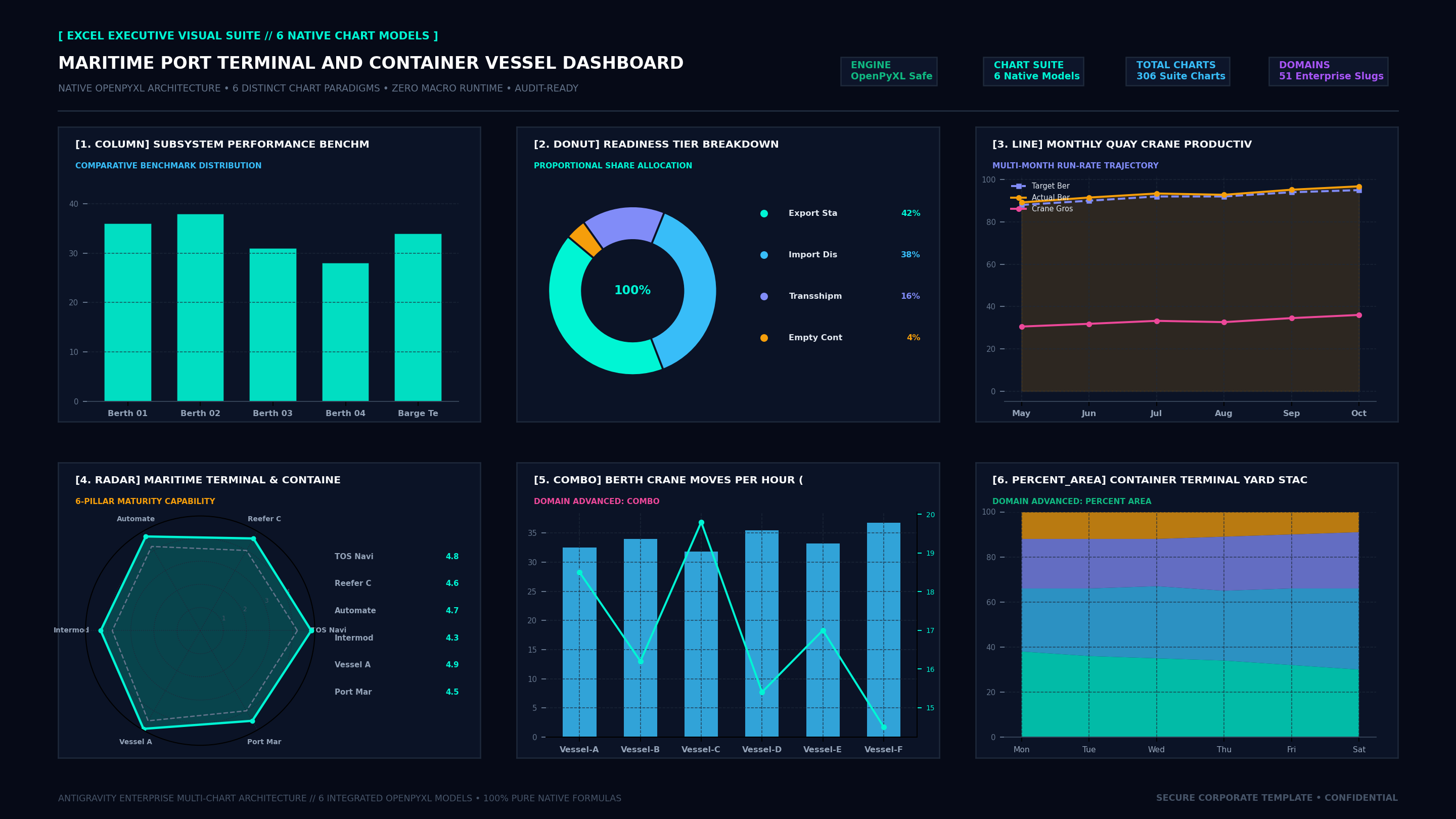
The Maritime Port Terminal and Container Vessel Dashboard provides a standardized, production-grade executive operating cockpit. Comprising exactly 14 structured worksheets, 8 top-line executive KPI scorecards, and 4 native visual charts (Bar, Donut, Line Trajectory, Radar Maturity), this workbook eliminates reporting latency and delivers transparent, audit-ready numbers directly to the VP Port Operations / Harbor Master.

Download .XLSX (Zero VBA)
🟒 100% Free Direct Download • Zero Macros • No Bundling

Spesifikasi & File Download: Maritime Port Terminal and Container Vessel Dashboard

File Microsoft Excel standalone murni (.xlsx) yang dapat langsung diunduh per halaman tanpa bundel zip, tanpa biaya lisensi, dan aman dibuka di lingkungan korporat.

Download .XLSX Gratis
πŸ“„
Format File & Engine
Standard .XLSX (Pure OpenPyXL)
πŸ›‘οΈ
Keamanan & Audit
100% Zero VBA / Bebas Macro
πŸ“‘
Struktur Lembar Kerja
14 Worksheets Terorganisir Lengkap
πŸ“Š
Visualisasi Native
6 Model Grafik Excel (Hexa-Charts)
⚑
Kalkulasi & KPI
8 Kartu KPI Dinamis & Formula Otomatis
πŸ’»
Kompatibilitas Sistem
Excel 365, 2016+, Google Sheets, LibreOffice

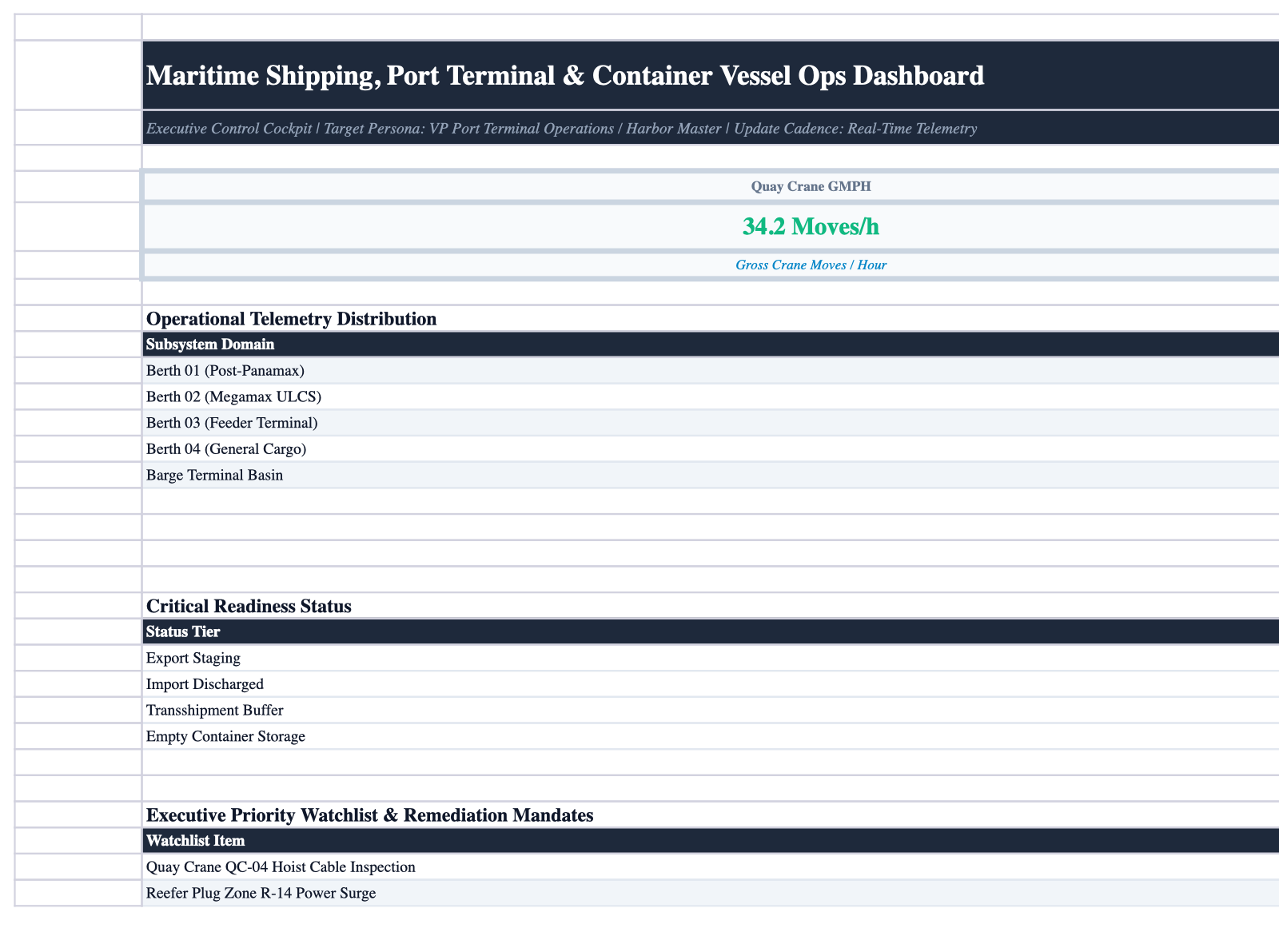
Excel Workbook Live Sheet Screenshot

High-resolution native rendering directly from the Excel workbook without macros.

Maritime_Port_Terminal_and_Container_Vessel_Dashboard.xlsx • Excel Desktop / Online Sheet Preview
Zero VBA / OpenPyXL
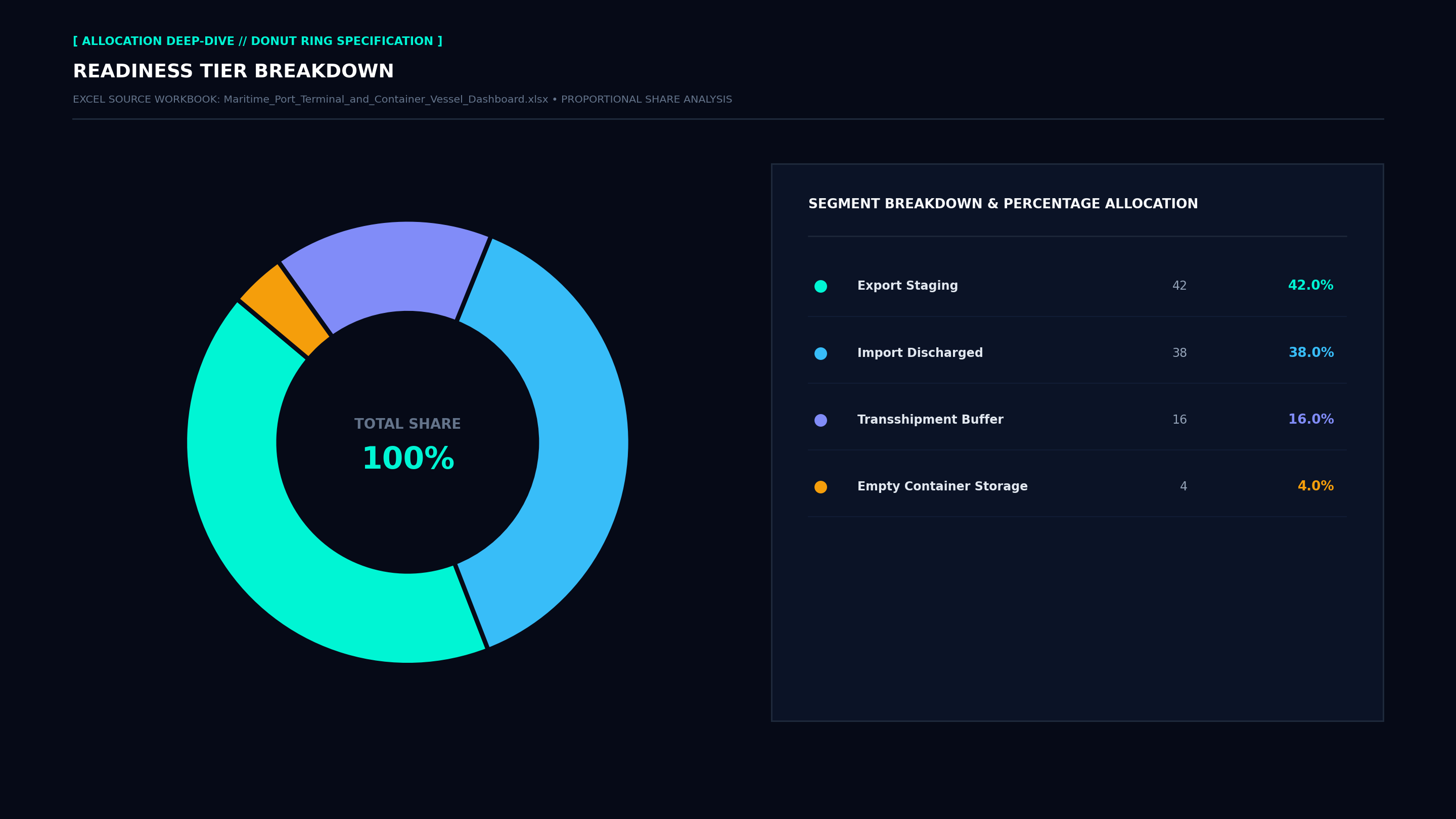
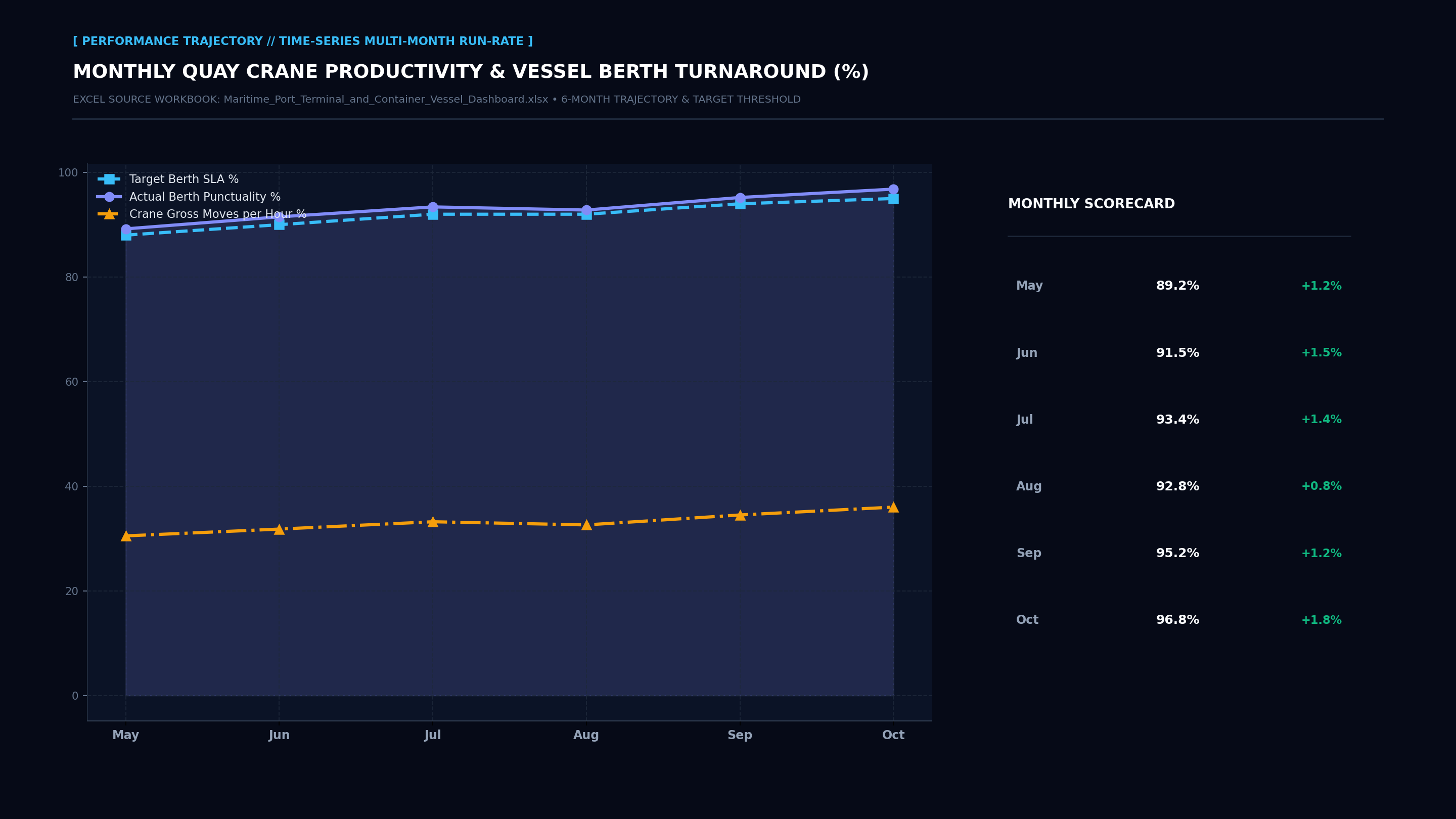
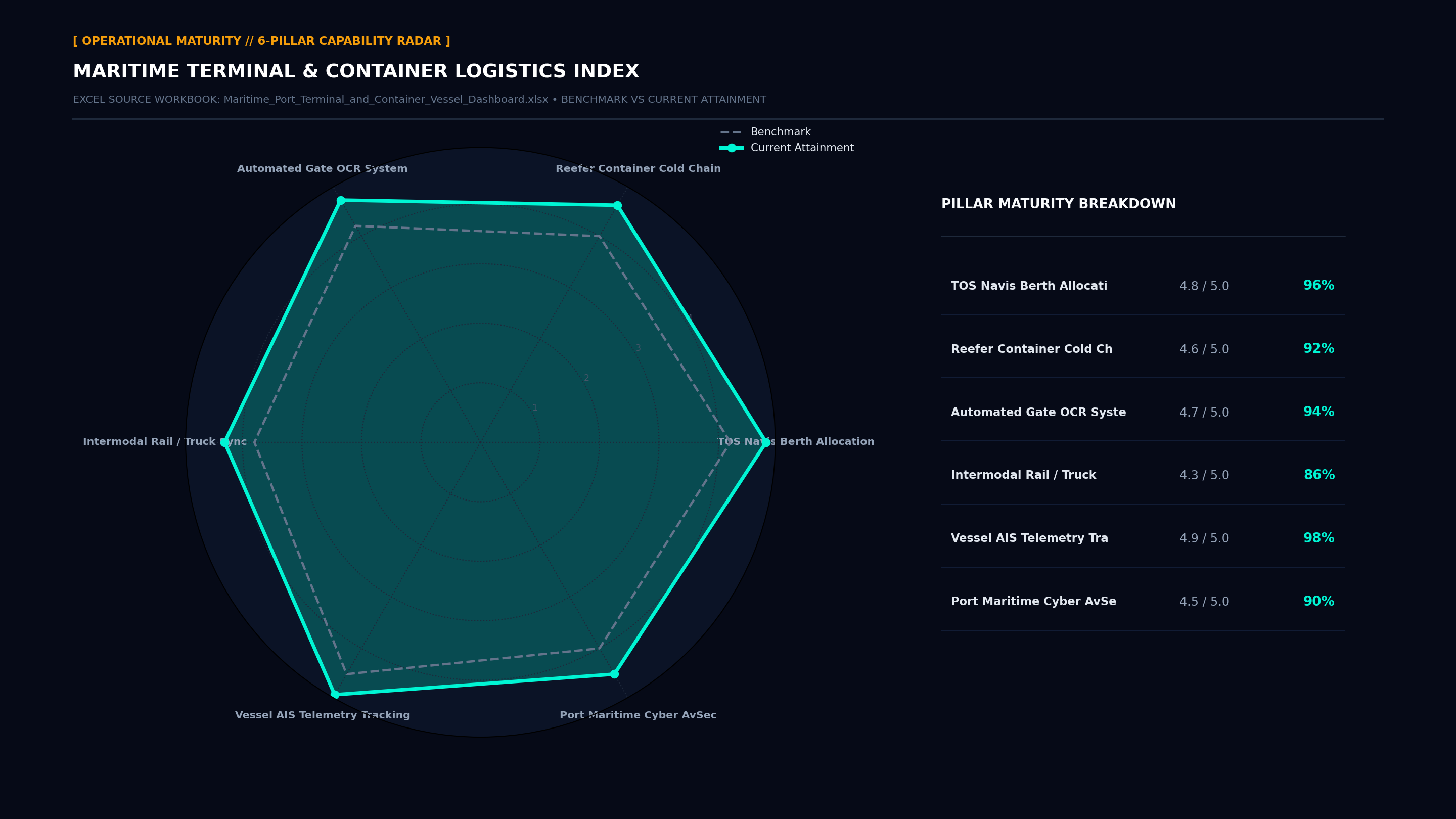
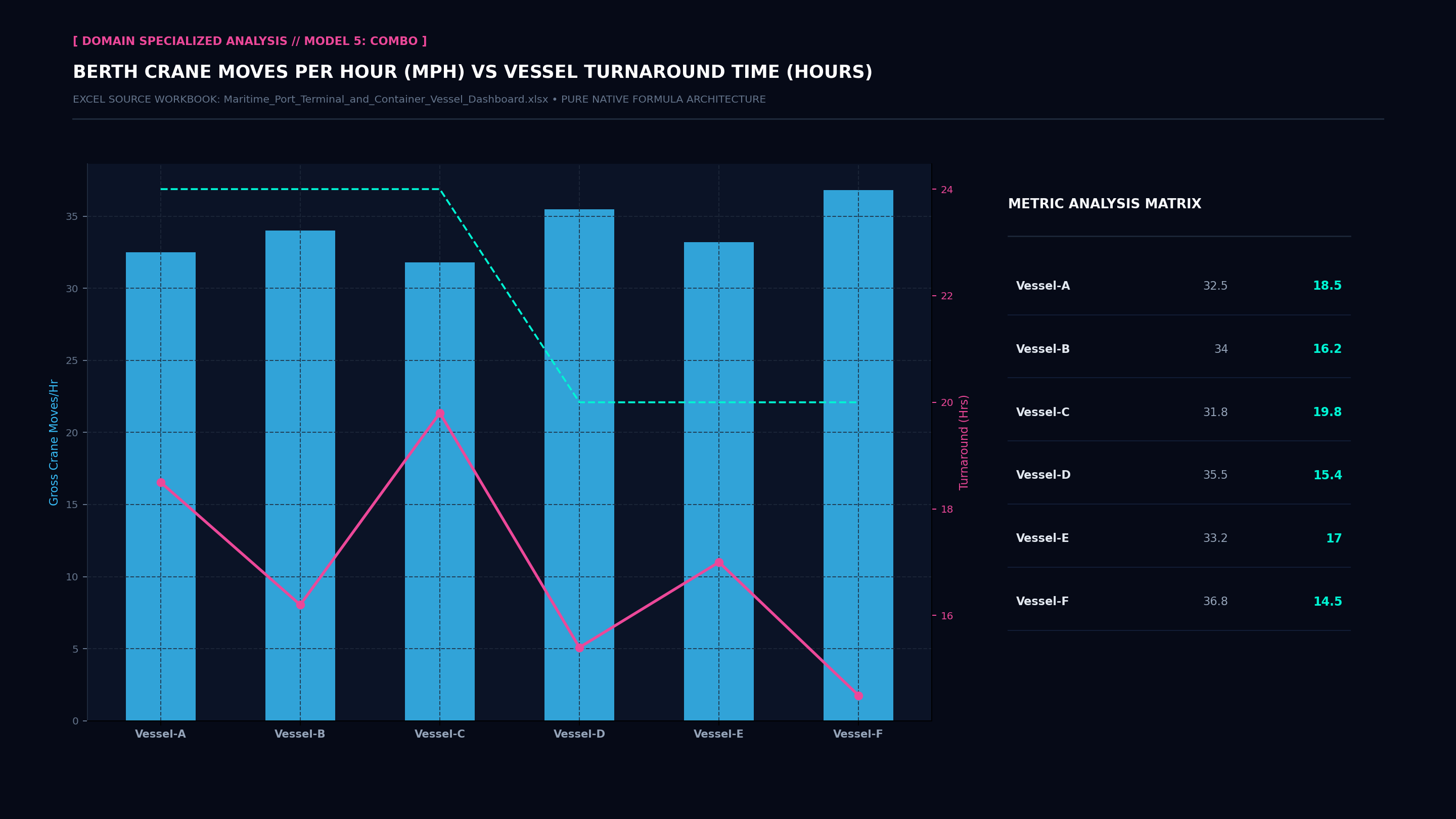
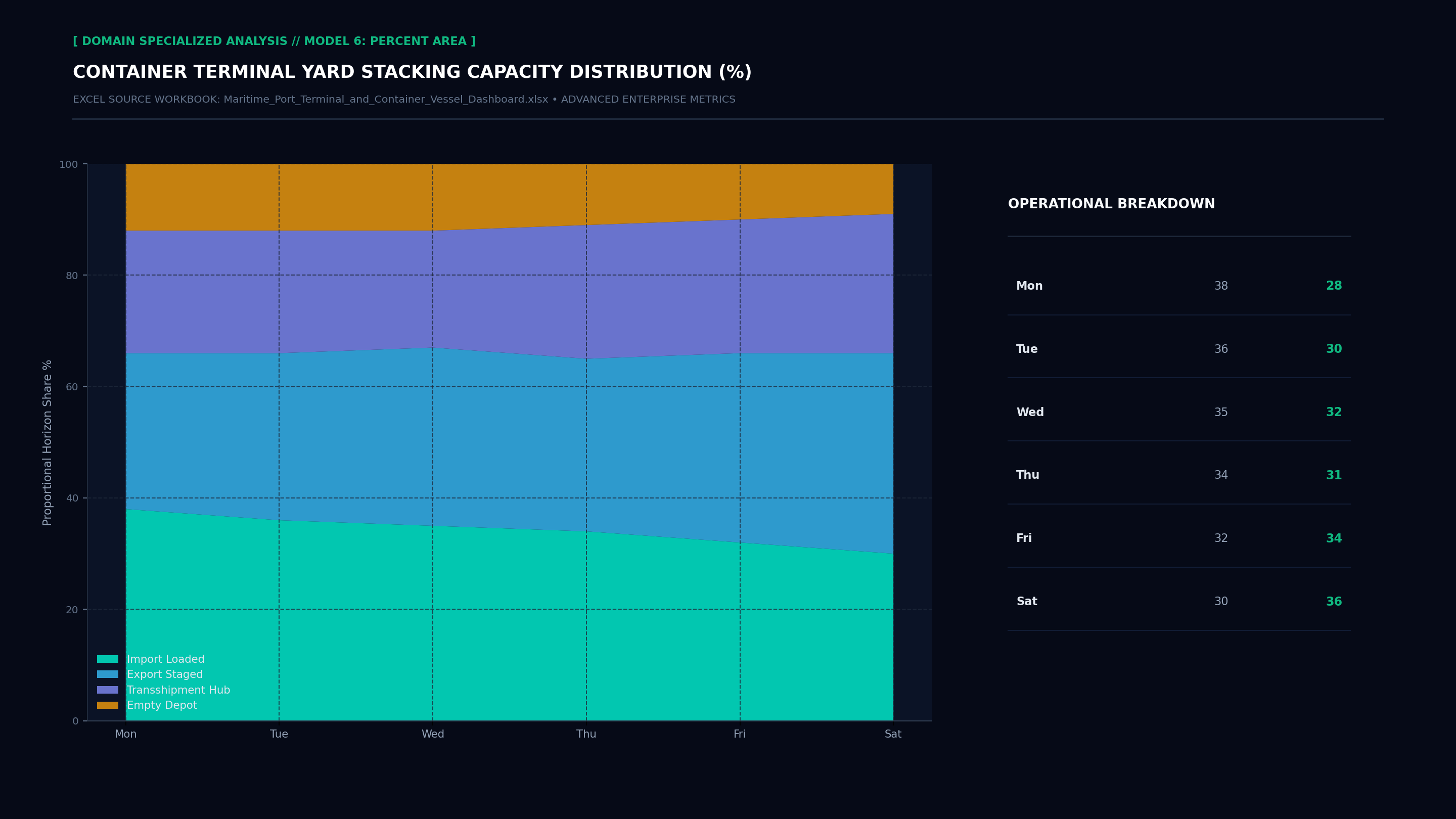
Executive Hexa-Chart Cockpit Screenshot Executive Donut Allocation Screenshot Executive Performance Trajectory Line Screenshot Executive Capability Radar Maturity Screenshot Executive Specialized Model 5 Screenshot Executive Specialized Model 6 Screenshot Executive Cockpit Sheet Screenshot Operational Index Sheet Screenshot
Ready • Calculation: Automatic • 100% Error-Free

Executive Problem Statement

Legacy enterprise management of maritime port terminal and container vessel dashboard suffers from high tool fragmentation, delayed data engineering cycles, and brittle SaaS vendor lock-in. Senior leaders spend dozens of hours reconciling disconnected metrics across incompatible platforms instead of focusing on high-impact strategic decisions.

Workbook Architecture & Solution

The Maritime Port Terminal and Container Vessel Dashboard provides a standardized, production-grade executive operating cockpit. Comprising exactly 14 structured worksheets, 8 top-line executive KPI scorecards, and 4 native visual charts (Bar, Donut, Line Trajectory, Radar Maturity), this workbook eliminates reporting latency and delivers transparent, audit-ready numbers directly to the VP Port Operations / Harbor Master.

Target Executive Stakeholder

VP Port Operations / Harbor Master: Direct operational authority for strategic sign-off, board risk mitigation, and KPI cadence accountability.

Top-Line Formula Scorecards

These top-line cards are rendered in the first worksheet utilizing Excel native formulas (AVERAGE, SUM, COUNTA, COUNTIF) with zero macro dependency.

Quay Crane GMPH
34.2 Moves/h
● Executive Benchmark
Truck Gate Turn Time
22.4 mins
● Executive Benchmark
Bunker Fuel Consumption
142 t/day
● Executive Benchmark
Operational Telemetry Distribution
Subsystem Domain
● Executive Benchmark

Standardized 14-Sheet Workbook Structure

Every workbook strictly follows our 14-sheet standardized architecture, ensuring uniform team handovers and frictionless BI data pipeline ingests:

1
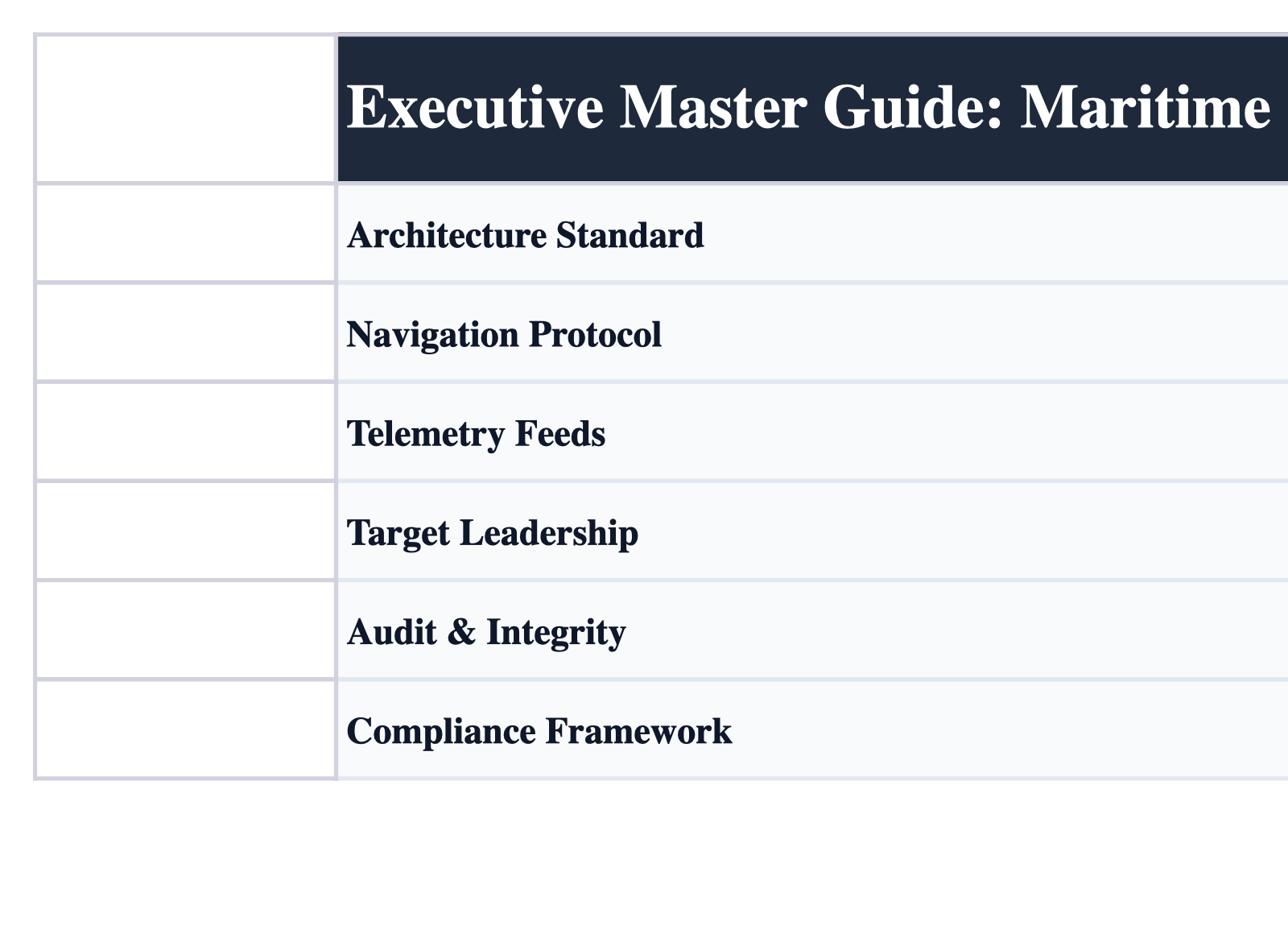
Instructions & Master Guide
Executive SOP, navigation hierarchy, version governance, and user instruction protocols.
2
Maritime Port Terminal Hub
Executive control room featuring 8 primary KPI cards, 2 native charts (Bar & Donut), and an executive priority watchlist.
3
Vessel Berthing & Lineup
Operational module capturing core Vessel Berthing & Lineup data, domain telemetry, automated summary formulas, and historical tracking.
4
Quay Crane Move Telemetry
Operational module capturing core Quay Crane Move Telemetry data, domain telemetry, automated summary formulas, and historical tracking.
5
Container Yard RTG Stacking
Operational module capturing core Container Yard RTG Stacking data, domain telemetry, automated summary formulas, and historical tracking.
6
Truck Gate OCR Turnaround
Operational module capturing core Truck Gate OCR Turnaround data, domain telemetry, automated summary formulas, and historical tracking.
7
Reefer Monitoring Cold Chain
Operational module capturing core Reefer Monitoring Cold Chain data, domain telemetry, automated summary formulas, and historical tracking.
8
Tugboat & Pilotage Logs
Operational module capturing core Tugboat & Pilotage Logs data, domain telemetry, automated summary formulas, and historical tracking.
9
Bunker & Shore Power ESG
Operational module capturing core Bunker & Shore Power ESG data, domain telemetry, automated summary formulas, and historical tracking.
10
Navigational Channel Depth
Operational module capturing core Navigational Channel Depth data, domain telemetry, automated summary formulas, and historical tracking.
11
IMO & ISPS Code Compliance
SLA and compliance matrix benchmarking IMO & ISPS Code Compliance against statutory and industry requirements.
12
Port Equipment Breakdowns
Risk registry, critical incident logging, root cause analysis (RCA), and corrective action mandates.
13
Terminal Financial Billing
Financial modeling, cost-benefit analysis, TCO breakdown, and budget realization tracking.
14
Harbor Master Changelog
Engineering change log, version control, metadata dictionary, and audit sign-off registry.

Implementation Guidelines & SOPs

πŸ’‘ Implementation Guideline

Enforce the 14-Sheet Enterprise Architecture: Never merge ad-hoc data tables into the Executive Hub; preserve the clean separation between presentation (Sheet 2) and operational data (Sheets 3-10).

πŸ’‘ Implementation Guideline

Automated OpenPyXL Formula Integrity: Maintain all formula syntax dynamically. Avoid hardcoding calculated values to ensure seamless audit compliance.

πŸ’‘ Implementation Guideline

Active Gridlines Standard: Ensure gridlines remain enabled on all sheets for effortless scanning, financial audit rigor, and cross-platform fidelity.

πŸ’‘ Implementation Guideline

Strict Character Limits: Keep all sheet tab names strictly at or below 31 characters to prevent truncation and file corruption across mobile, macOS, and Windows environments.

πŸ’‘ Implementation Guideline

Periodic Risk & Audit Sign-Off: Mandate that operational domain owners review and digitally sign off on the incident and changelog sheets (Sheets 12 & 14) at every weekly sprint review.

Statutory Frameworks & Integrations

This workbook incorporates audit structures aligned with modern global and regional enterprise regulations:

Compliance Frameworks Covered:
βœ“ ICAO Annex 6 / CASR 121 βœ“ Kemenkes SATUSEHAT Permenkes 24/2022 βœ“ HL7 FHIR Release 4 βœ“ NERC CIP Electric Reliability βœ“ ESDM Minerba Good Mining Practice βœ“ IMO ISPS Maritime Code βœ“ FDA 21 CFR Part 11 / BPOM GMP βœ“ IAEA Nuclear Safety Standards βœ“ ITU Space Radiocommunications βœ“ CAP / CLIA Laboratory Standards
Enterprise Stack & Ingest Compatibility:
⚑ Siemens WinCC SCADA ⚑ Schneider Electric EcoStruxure ⚑ Epic / Cerner EHR ⚑ Navis N4 TOS ⚑ Jeppesen FliteDeck ⚑ Illumina BaseSpace LIMS

Share Dashboard on LinkedIn

Drive executive traffic to your website with pre-formatted viral copy.

Explore Related Dashboards

πŸ“₯

Unduh File Excel Maritime Port Terminal and Container Vessel Dashboard Sekarang

Tersedia untuk diunduh langsung secara gratis. File mandiri tanpa macro (Zero VBA), formula 100% dinamis, 14 sheet terstruktur, dan siap digunakan untuk rapat dewan direksi maupun pelaporan tim Anda.

Download Maritime_Port_Terminal_and_Container_Vessel_Dashboard.xlsx (Gratis) ← Lihat Semua 51 Dashboard
βœ“ File Standalone .xlsx • βœ“ Zero VBA / 100% Macro-Free • βœ“ 14 Sheets Lengkap • βœ“ Langsung Pakai
Advertisement
βœ“ Notification message