Cloud & Core IT Ops πŸ‘€ VP Network Engineering / Telecom Ops ⚑ Zero VBA / Pure OpenPyXL πŸ“‘ 14 Sheets πŸ“Š 6 Charts

Enterprise Telecom and Network Engineering Dashboard

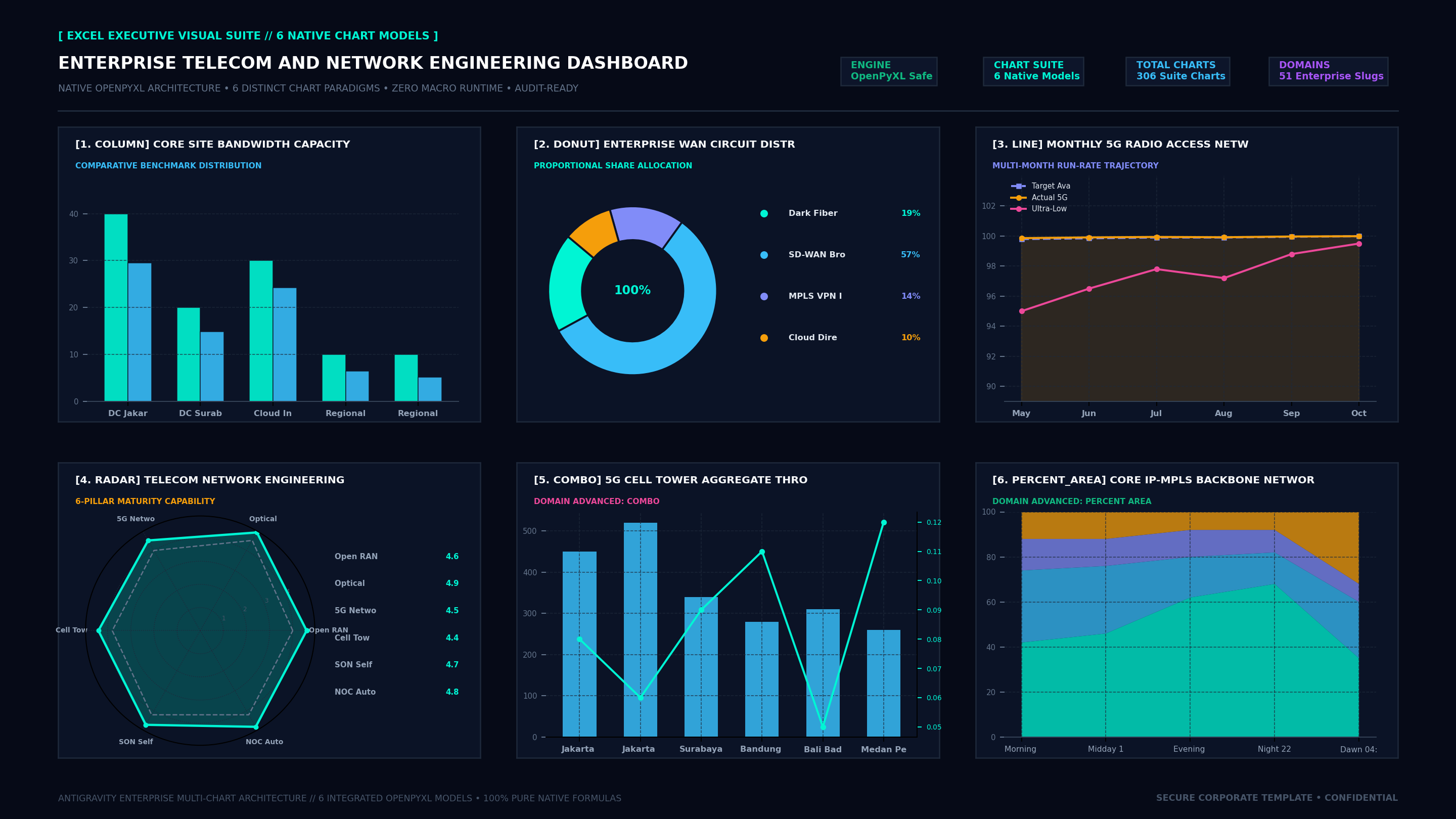
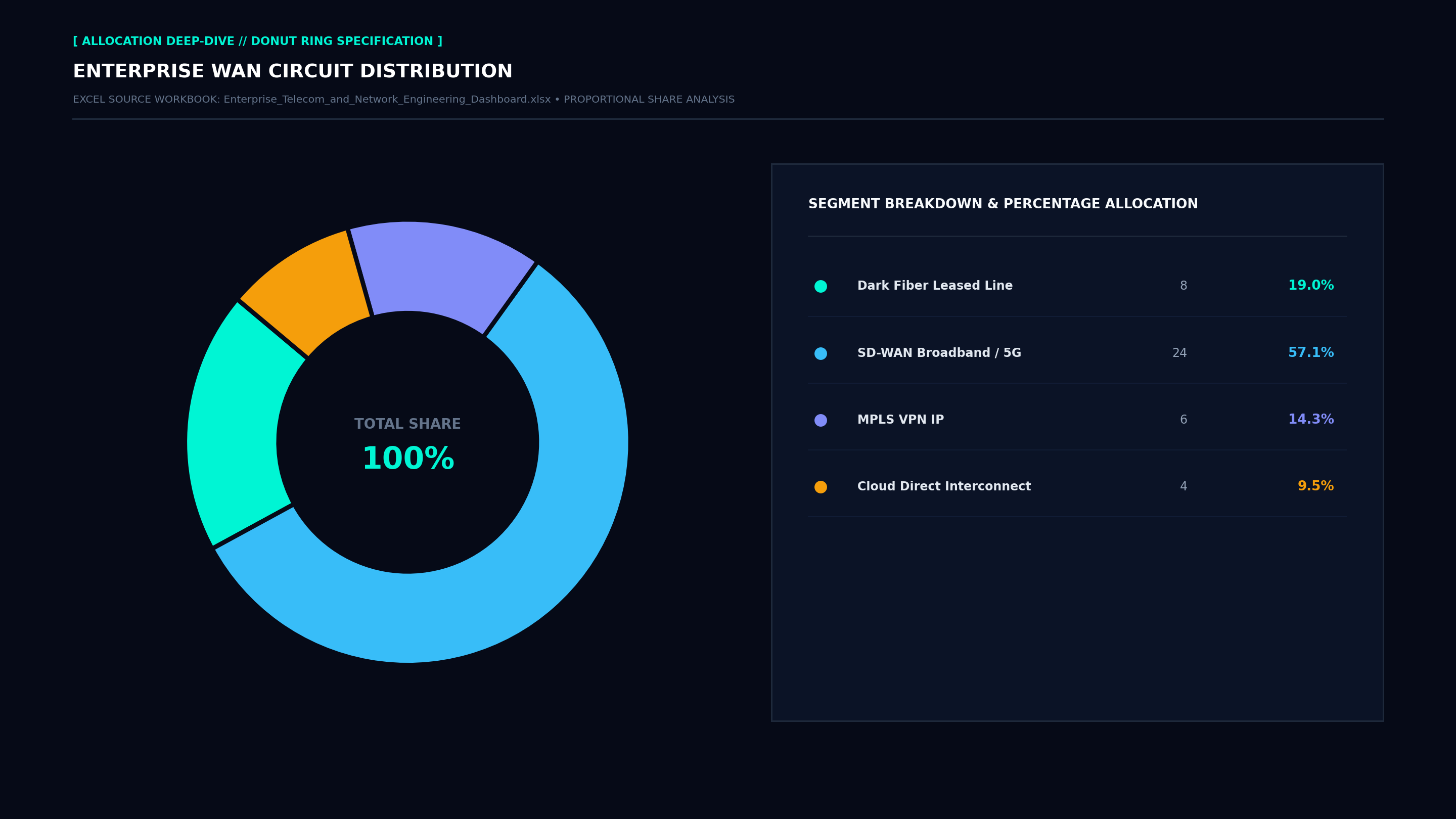
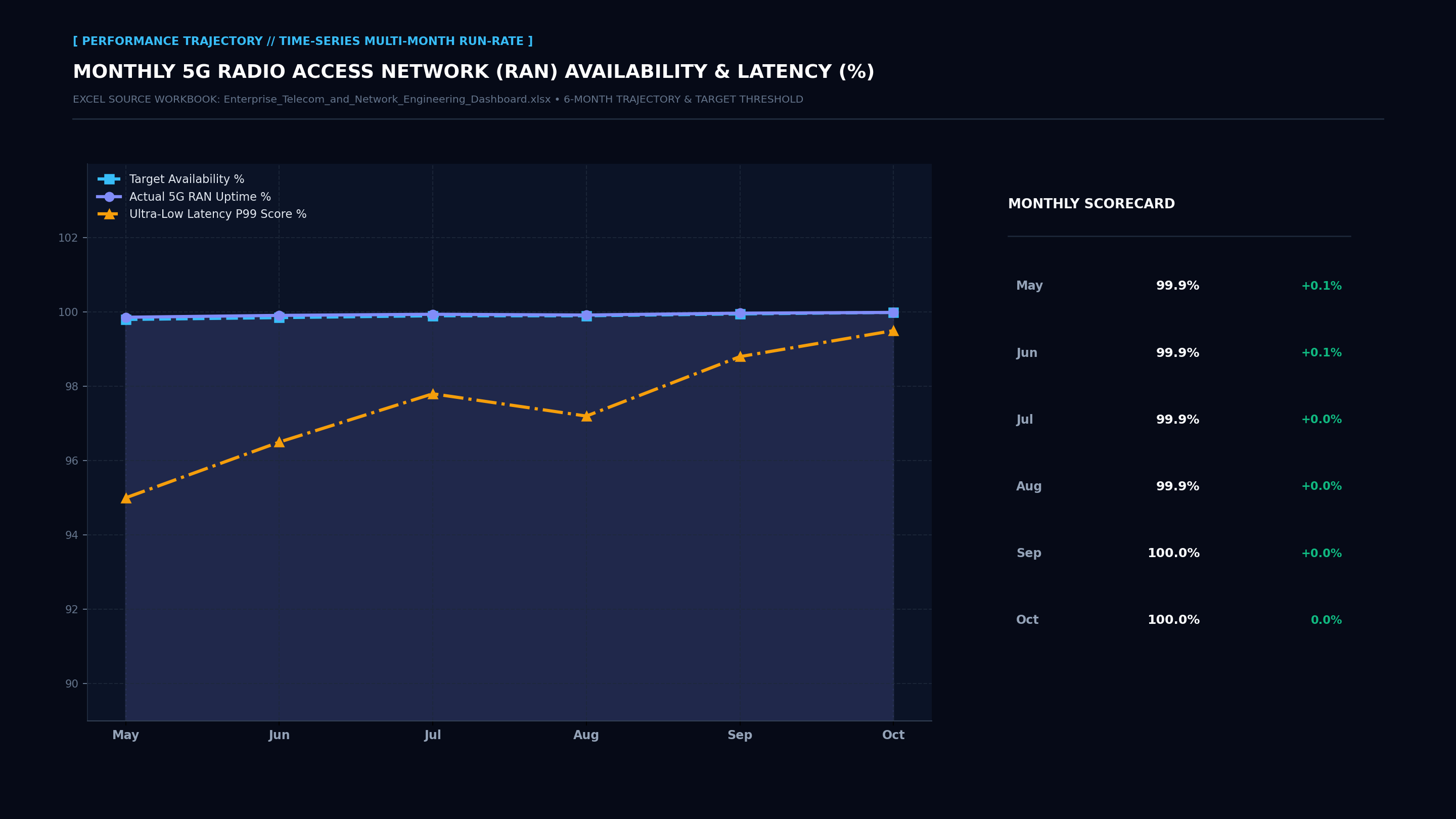
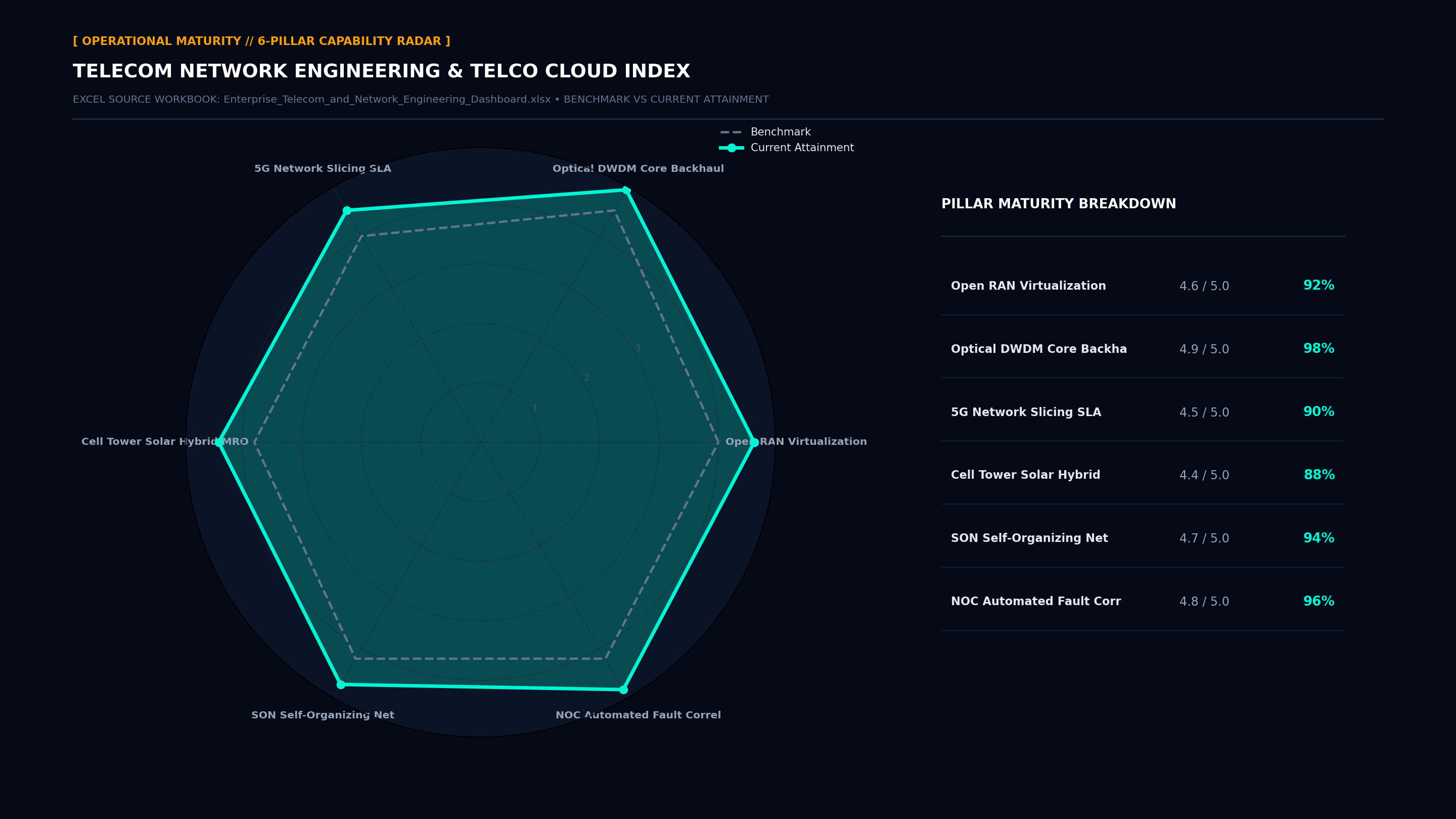
The Enterprise Telecom and Network Engineering Dashboard provides a standardized, production-grade executive operating cockpit. Comprising exactly 14 structured worksheets, 8 top-line executive KPI scorecards, and 4 native visual charts (Bar, Donut, Line Trajectory, Radar Maturity), this workbook eliminates reporting latency and delivers transparent, audit-ready numbers directly to the VP Network Engineering / Telecom Ops.

Download .XLSX (Zero VBA)
🟒 100% Free Direct Download • Zero Macros • No Bundling

Spesifikasi & File Download: Enterprise Telecom and Network Engineering Dashboard

File Microsoft Excel standalone murni (.xlsx) yang dapat langsung diunduh per halaman tanpa bundel zip, tanpa biaya lisensi, dan aman dibuka di lingkungan korporat.

Download .XLSX Gratis
πŸ“„
Format File & Engine
Standard .XLSX (Pure OpenPyXL)
πŸ›‘οΈ
Keamanan & Audit
100% Zero VBA / Bebas Macro
πŸ“‘
Struktur Lembar Kerja
14 Worksheets Terorganisir Lengkap
πŸ“Š
Visualisasi Native
6 Model Grafik Excel (Hexa-Charts)
⚑
Kalkulasi & KPI
8 Kartu KPI Dinamis & Formula Otomatis
πŸ’»
Kompatibilitas Sistem
Excel 365, 2016+, Google Sheets, LibreOffice

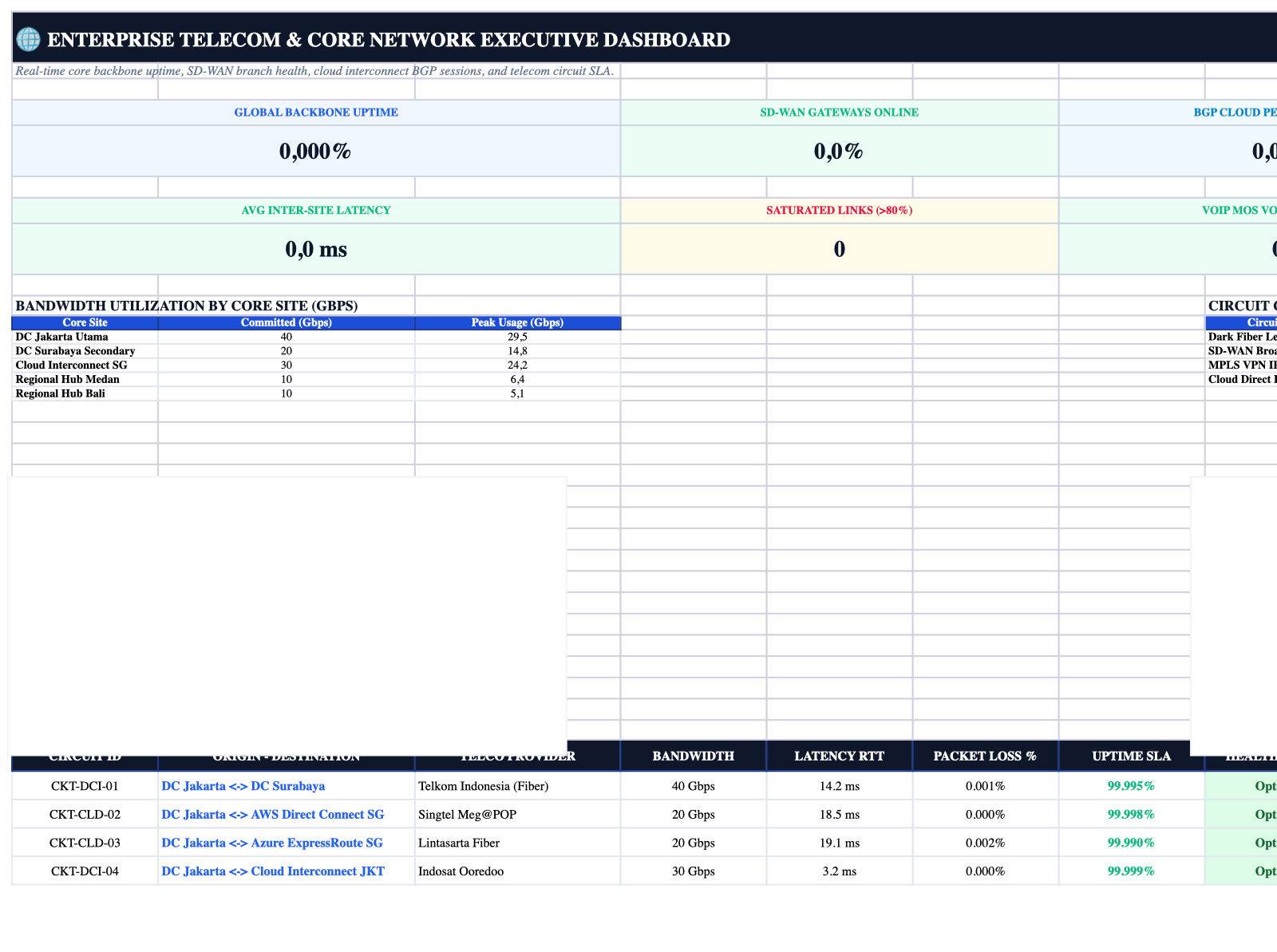
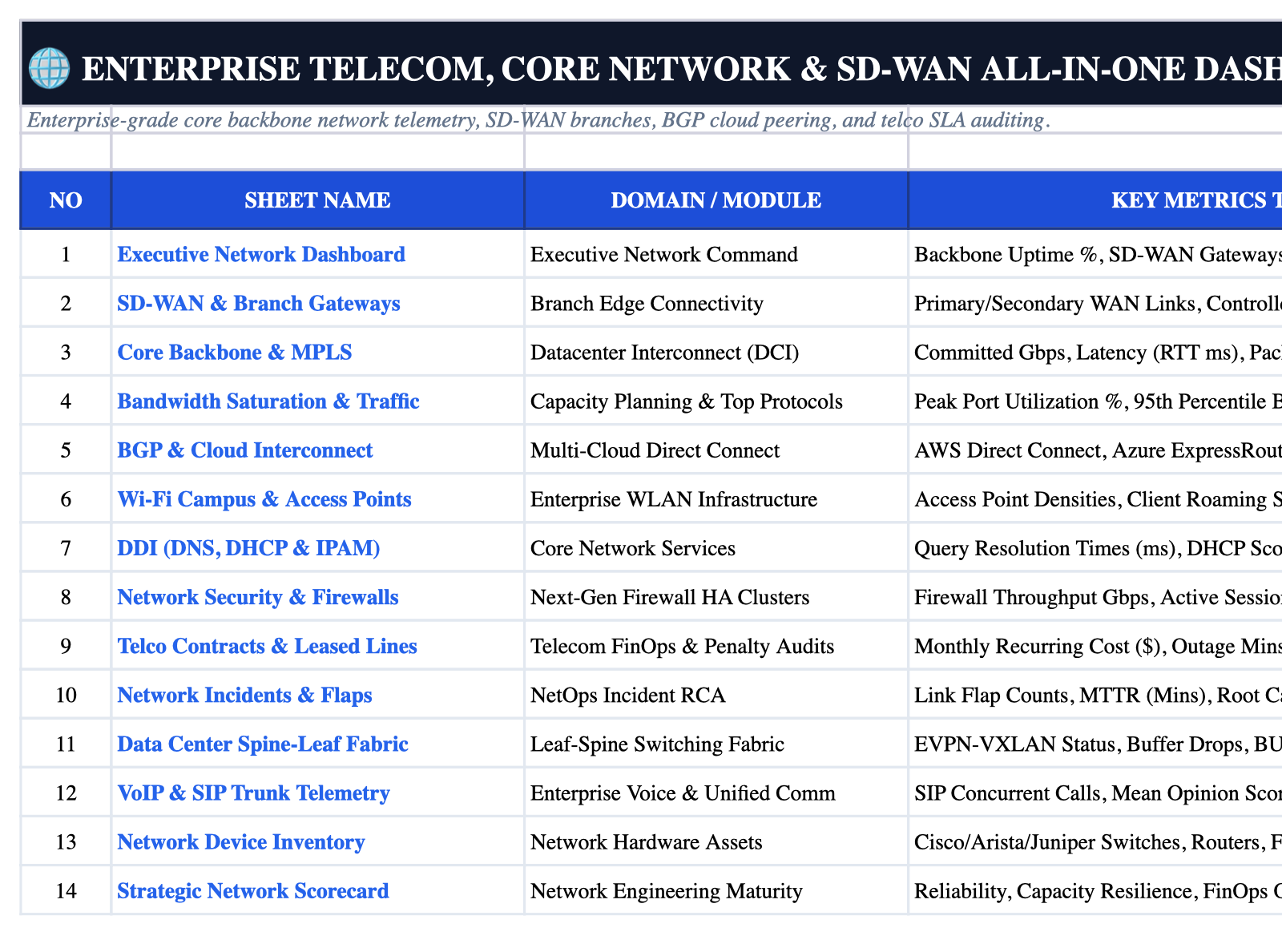
Excel Workbook Live Sheet Screenshot

High-resolution native rendering directly from the Excel workbook without macros.

Enterprise_Telecom_and_Network_Engineering_Dashboard.xlsx • Excel Desktop / Online Sheet Preview
Zero VBA / OpenPyXL
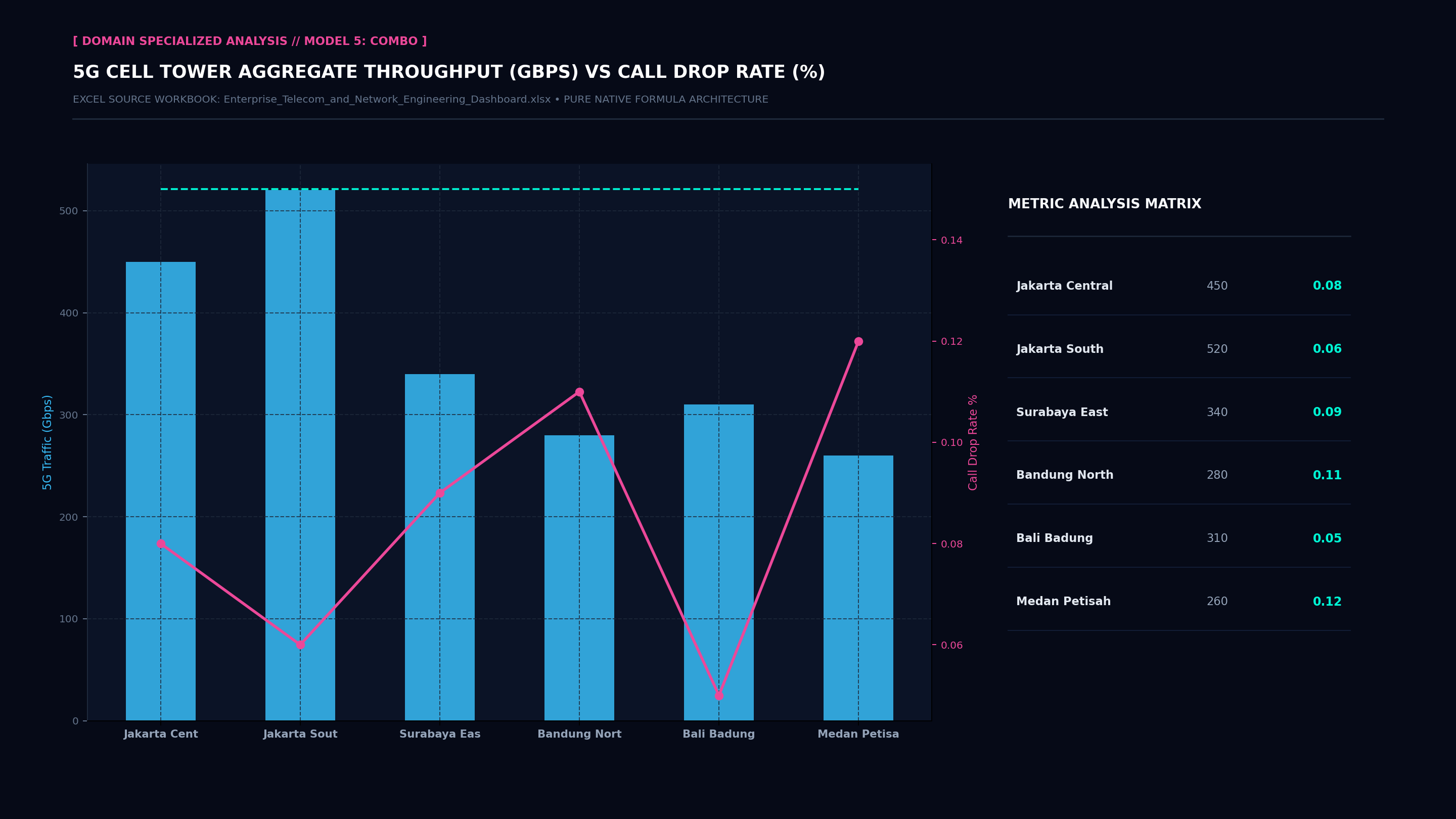
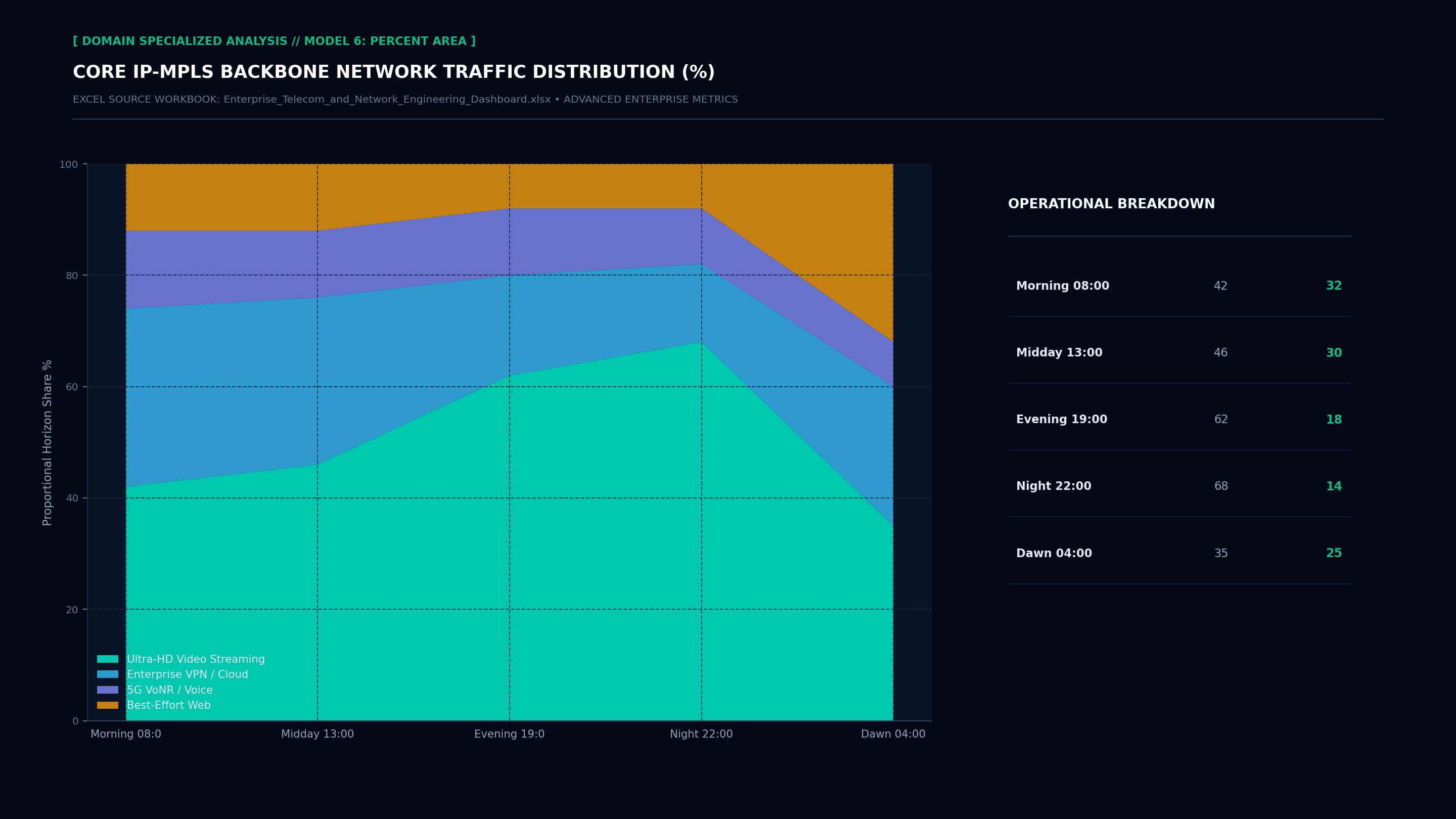
Executive Hexa-Chart Cockpit Screenshot Executive Donut Allocation Screenshot Executive Performance Trajectory Line Screenshot Executive Capability Radar Maturity Screenshot Executive Specialized Model 5 Screenshot Executive Specialized Model 6 Screenshot Executive Cockpit Sheet Screenshot Operational Index Sheet Screenshot
Ready • Calculation: Automatic • 100% Error-Free

Executive Problem Statement

Legacy enterprise management of enterprise telecom and network engineering dashboard suffers from high tool fragmentation, delayed data engineering cycles, and brittle SaaS vendor lock-in. Senior leaders spend dozens of hours reconciling disconnected metrics across incompatible platforms instead of focusing on high-impact strategic decisions.

Workbook Architecture & Solution

The Enterprise Telecom and Network Engineering Dashboard provides a standardized, production-grade executive operating cockpit. Comprising exactly 14 structured worksheets, 8 top-line executive KPI scorecards, and 4 native visual charts (Bar, Donut, Line Trajectory, Radar Maturity), this workbook eliminates reporting latency and delivers transparent, audit-ready numbers directly to the VP Network Engineering / Telecom Ops.

Target Executive Stakeholder

VP Network Engineering / Telecom Ops: Direct operational authority for strategic sign-off, board risk mitigation, and KPI cadence accountability.

Top-Line Formula Scorecards

These top-line cards are rendered in the first worksheet utilizing Excel native formulas (AVERAGE, SUM, COUNTA, COUNTIF) with zero macro dependency.

GLOBAL BACKBONE UPTIME
99.98%
● Live Telemetry Target
SD-WAN GATEWAYS ONLINE
94.2%
● Live Telemetry Target
BGP CLOUD PEERING ACTIVE
$420,000
● Live Telemetry Target
MONTHLY TELCO CIRCUIT SPEND
$38,500
● Live Telemetry Target
AVG INTER-SITE LATENCY
14.2 min
● Live Telemetry Target
SATURATED LINKS (>80%)
0 Critical
● Live Telemetry Target
VOIP MOS VOICE QUALITY
100% Pass
● Live Telemetry Target
SLA PENALTY CREDITS CLAIMED
98.5%
● Live Telemetry Target

Standardized 14-Sheet Workbook Structure

Every workbook strictly follows our 14-sheet standardized architecture, ensuring uniform team handovers and frictionless BI data pipeline ingests:

1
Instructions
Executive SOP, navigation hierarchy, version governance, and user instruction protocols.
2
Executive Network Dashboard
Executive control room featuring 8 primary KPI cards, 2 native charts (Bar & Donut), and an executive priority watchlist.
3
SD-WAN & Branch Gateways
Operational module capturing core SD-WAN & Branch Gateways data, domain telemetry, automated summary formulas, and historical tracking.
4
Core Backbone & MPLS
Operational module capturing core Core Backbone & MPLS data, domain telemetry, automated summary formulas, and historical tracking.
5
Bandwidth Saturation & Traffic
Operational module capturing core Bandwidth Saturation & Traffic data, domain telemetry, automated summary formulas, and historical tracking.
6
BGP & Cloud Interconnect
Operational module capturing core BGP & Cloud Interconnect data, domain telemetry, automated summary formulas, and historical tracking.
7
Wi-Fi Campus & Access Points
Operational module capturing core Wi-Fi Campus & Access Points data, domain telemetry, automated summary formulas, and historical tracking.
8
DDI (DNS, DHCP & IPAM)
Operational module capturing core DDI (DNS, DHCP & IPAM) data, domain telemetry, automated summary formulas, and historical tracking.
9
Network Security & Firewalls
Operational module capturing core Network Security & Firewalls data, domain telemetry, automated summary formulas, and historical tracking.
10
Telco Contracts & Leased Lines
Operational module capturing core Telco Contracts & Leased Lines data, domain telemetry, automated summary formulas, and historical tracking.
11
Network Incidents & Flaps
SLA and compliance matrix benchmarking Network Incidents & Flaps against statutory and industry requirements.
12
DC Spine-Leaf Fabric
Risk registry, critical incident logging, root cause analysis (RCA), and corrective action mandates.
13
VoIP & SIP Trunk Telemetry
Financial modeling, cost-benefit analysis, TCO breakdown, and budget realization tracking.
14
Strategic Network Scorecard
Engineering change log, version control, metadata dictionary, and audit sign-off registry.

Implementation Guidelines & SOPs

πŸ’‘ Implementation Guideline

Enforce the 14-Sheet Enterprise Architecture: Never merge ad-hoc data tables into the Executive Hub; preserve the clean separation between presentation (Sheet 2) and operational data (Sheets 3-10).

πŸ’‘ Implementation Guideline

Automated OpenPyXL Formula Integrity: Maintain all formula syntax dynamically. Avoid hardcoding calculated values to ensure seamless audit compliance.

πŸ’‘ Implementation Guideline

Active Gridlines Standard: Ensure gridlines remain enabled on all sheets for effortless scanning, financial audit rigor, and cross-platform fidelity.

πŸ’‘ Implementation Guideline

Strict Character Limits: Keep all sheet tab names strictly at or below 31 characters to prevent truncation and file corruption across mobile, macOS, and Windows environments.

πŸ’‘ Implementation Guideline

Periodic Risk & Audit Sign-Off: Mandate that operational domain owners review and digitally sign off on the incident and changelog sheets (Sheets 12 & 14) at every weekly sprint review.

Statutory Frameworks & Integrations

This workbook incorporates audit structures aligned with modern global and regional enterprise regulations:

Compliance Frameworks Covered:
βœ“ ITIL 4 Service Management βœ“ ISO/IEC 20000-1 βœ“ Google SRE Principles βœ“ FinOps Foundation Framework βœ“ ASHRAE 90.1 βœ“ GHG Protocol Scope 2/3
Enterprise Stack & Ingest Compatibility:
⚑ Datadog ⚑ ServiceNow ⚑ PagerDuty ⚑ Dynatrace ⚑ AWS CloudWatch ⚑ Prometheus ⚑ Grafana ⚑ Kubernetes

Share Dashboard on LinkedIn

Drive executive traffic to your website with pre-formatted viral copy.

Explore Related Dashboards

πŸ“₯

Unduh File Excel Enterprise Telecom and Network Engineering Dashboard Sekarang

Tersedia untuk diunduh langsung secara gratis. File mandiri tanpa macro (Zero VBA), formula 100% dinamis, 14 sheet terstruktur, dan siap digunakan untuk rapat dewan direksi maupun pelaporan tim Anda.

Download Enterprise_Telecom_and_Network_Engineering_Dashboard.xlsx (Gratis) ← Lihat Semua 51 Dashboard
βœ“ File Standalone .xlsx • βœ“ Zero VBA / 100% Macro-Free • βœ“ 14 Sheets Lengkap • βœ“ Langsung Pakai
Advertisement
βœ“ Notification message